
How we impact
act PROSPERI.AI
Act Digital Corporate Artificial Intelligence
Solutions
Services
Partners
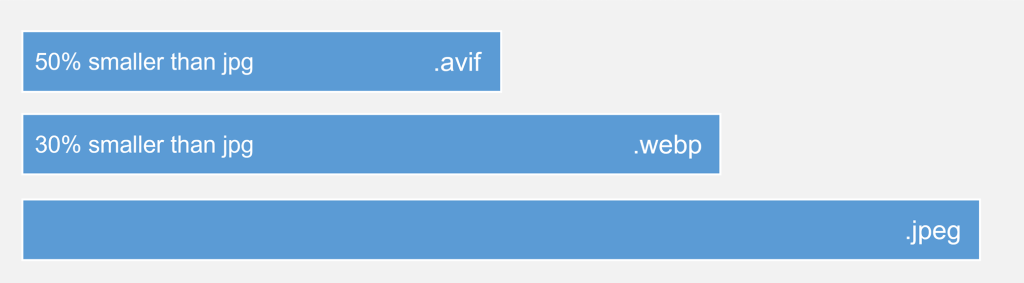
The best compression in comparison to all formats
First things first, what is AVIF? According to the caniuse website:
“A modern image format based on the AV1 video format. AVIF generally has better compression than WebP, JPEG, PNG and GIF and is designed to supersede them. AVIF competes with JPEG XL which has similar compression quality and is generally seen as more feature rich than AVIF.”
In other words, AVIF is an image format, smaller than the most famous formats like PNG or JPG, without losing quality.
The use of this kind of format is very important for the reasons listed below:
The most famous tools today are the avif.io and Squoosh (from Google).
I recommend the usage of Squoosh, since you can change the configurations into the images and visually see how the conversion impacted your image.
The list of the compatible browsers can be found here: https://caniuse.com/avif
Even if the browser that you use must be compatible, if it isn’t, you can just use the polyfill and the <picture> tag below.
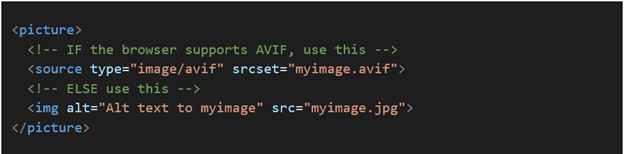
You don't need to wait for all browsers to support it – you can use content negotiation to determine browser support on the server, or use <picture> to provide a fallback to other supported image formats on the client, see the example below a fallback to a JPG image (in case of the AVIF format is not supported yet ):
The polyfill to “create” the feature into the browser is the following.
However, as much as this polyfill is official, it does not work on private tabs in old browser versions of Firefox (53+) and Edge (17+).
It’s recommended to have polyfill + Use the <picture> tag for fallbacks.
To see all the compatible versions using the polyfill, follow the docs: https://github.com/kagami/avif.js
The best compression in comparison to all formats
First things first, what is AVIF? According to the caniuse website:
“A modern image format based on the AV1 video format. AVIF generally has better compression than WebP, JPEG, PNG and GIF and is designed to supersede them. AVIF competes with JPEG XL which has similar compression quality and is generally seen as more feature rich than AVIF.”
In other words, AVIF is an image format, smaller than the most famous formats like PNG or JPG, without losing quality.
The use of this kind of format is very important for the reasons listed below:
The most famous tools today are the avif.io and Squoosh (from Google).
I recommend the usage of Squoosh, since you can change the configurations into the images and visually see how the conversion impacted your image.
The list of the compatible browsers can be found here: https://caniuse.com/avif
Even if the browser that you use must be compatible, if it isn’t, you can just use the polyfill and the <picture> tag below.
You don't need to wait for all browsers to support it – you can use content negotiation to determine browser support on the server, or use <picture> to provide a fallback to other supported image formats on the client, see the example below a fallback to a JPG image (in case of the AVIF format is not supported yet ):
The polyfill to “create” the feature into the browser is the following.
However, as much as this polyfill is official, it does not work on private tabs in old browser versions of Firefox (53+) and Edge (17+).
It’s recommended to have polyfill + Use the <picture> tag for fallbacks.
To see all the compatible versions using the polyfill, follow the docs: https://github.com/kagami/avif.js