
How we impact
act PROSPERI.AI
Act Digital Corporate Artificial Intelligence
Solutions
Services
Partners
In the world of data analytics, Power BI has emerged as a leading business intelligence tool, enabling organisations to transform their raw data into actionable insights.
Power BI offers a range of features and capabilities to enhance data analysis and reporting. Among these, the use of dataflows and shared datasets has become increasingly popular, as they provide a scalable and efficient architecture for data modeling and sharing within Power BI services.
In this article, we will explore how to develop a Power BI architecture by leveraging the use of dataflows and shared datasets, and we’ll discuss the numerous benefits it brings to organisations.
Dataflows in Power BI are a powerful mechanism for data preparation and transformation. With dataflows, you can connect to various data sources, apply transformations, and create reusable data entities known as dataflow tables.
These dataflow tables can then be used across multiple reports and dashboards, ensuring consistency and reducing redundancy in data modeling efforts.
Here are the main benefits of creating dataflows:
Shared datasets in Power BI are reusable datasets that can be used across multiple reports and workspaces.
By leveraging shared datasets, organisations guarantee the following benefits:
Now that we understand the benefits of dataflows and shared datasets, let's figure out how to develop a Power BI architecture that effectively uses these features. Let’s follow these steps:
Identify data sources and transformations: start by identifying the relevant data sources and the required data transformations. Use Power Query within dataflows to clean, filter, and shape the data according to your needs;

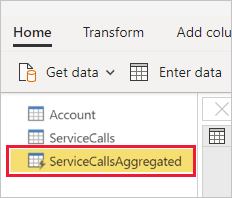
Create dataflow tables: Define dataflow tables within the dataflows, representing the transformed data entities. Ensure that the dataflow tables are structured appropriately and are optimised for reuse across multiple reports;
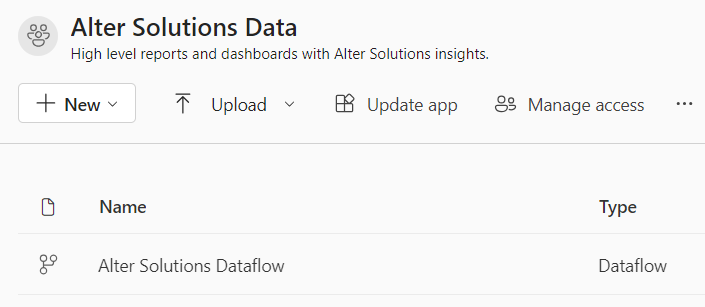
Publish dataflows: publish the dataflows to the desired workspace within Power BI services;
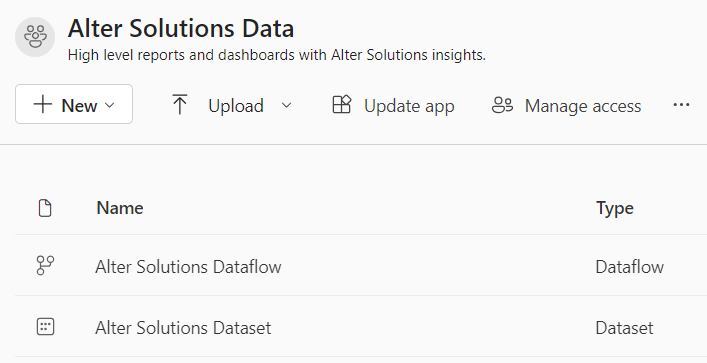
Create shared datasets: use the dataflow tables as the foundation for creating shared datasets. Define appropriate relationships, calculations, and measures within the shared datasets to enable consistent reporting;
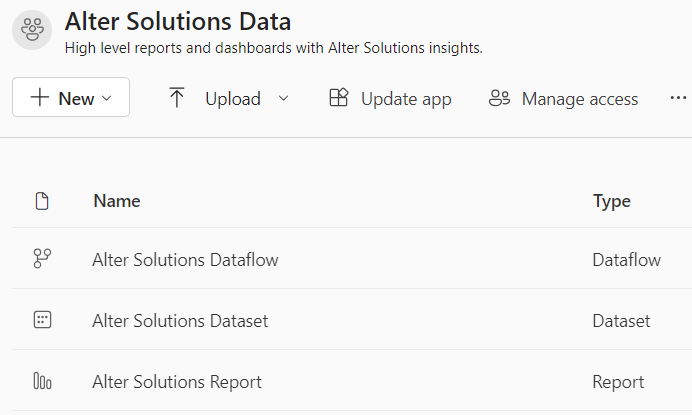
Build reports and dashboards: with the shared datasets in place, create reports and dashboards using Power BI Desktop.
When developing a Power BI architecture with dataflows and shared datasets, it's crucial to carefully consider the access control and permissions for dataflows, datasets, and reports within Power BI services. This ensures that the right users have the appropriate level of access to the data and reports, maintaining data security and integrity.
In the end, make sure you validate all these aspects:
By carefully considering access control and permissions for dataflows, datasets, and reports in Power BI Services, organisations can maintain data security, promote collaboration, and ensure regulatory compliance.
It is crucial to regularly review and update access permissions as user roles or data requirements evolve, ensuring that only authorised users have access to the appropriate data and reports.
In the world of data analytics, Power BI has emerged as a leading business intelligence tool, enabling organisations to transform their raw data into actionable insights.
Power BI offers a range of features and capabilities to enhance data analysis and reporting. Among these, the use of dataflows and shared datasets has become increasingly popular, as they provide a scalable and efficient architecture for data modeling and sharing within Power BI services.
In this article, we will explore how to develop a Power BI architecture by leveraging the use of dataflows and shared datasets, and we’ll discuss the numerous benefits it brings to organisations.
Dataflows in Power BI are a powerful mechanism for data preparation and transformation. With dataflows, you can connect to various data sources, apply transformations, and create reusable data entities known as dataflow tables.
These dataflow tables can then be used across multiple reports and dashboards, ensuring consistency and reducing redundancy in data modeling efforts.
Here are the main benefits of creating dataflows:
Shared datasets in Power BI are reusable datasets that can be used across multiple reports and workspaces.
By leveraging shared datasets, organisations guarantee the following benefits:
Now that we understand the benefits of dataflows and shared datasets, let's figure out how to develop a Power BI architecture that effectively uses these features. Let’s follow these steps:
Identify data sources and transformations: start by identifying the relevant data sources and the required data transformations. Use Power Query within dataflows to clean, filter, and shape the data according to your needs;
Create dataflow tables: Define dataflow tables within the dataflows, representing the transformed data entities. Ensure that the dataflow tables are structured appropriately and are optimised for reuse across multiple reports;
Publish dataflows: publish the dataflows to the desired workspace within Power BI services;
Create shared datasets: use the dataflow tables as the foundation for creating shared datasets. Define appropriate relationships, calculations, and measures within the shared datasets to enable consistent reporting;
Build reports and dashboards: with the shared datasets in place, create reports and dashboards using Power BI Desktop.
When developing a Power BI architecture with dataflows and shared datasets, it's crucial to carefully consider the access control and permissions for dataflows, datasets, and reports within Power BI services. This ensures that the right users have the appropriate level of access to the data and reports, maintaining data security and integrity.
In the end, make sure you validate all these aspects:
By carefully considering access control and permissions for dataflows, datasets, and reports in Power BI Services, organisations can maintain data security, promote collaboration, and ensure regulatory compliance.
It is crucial to regularly review and update access permissions as user roles or data requirements evolve, ensuring that only authorised users have access to the appropriate data and reports.