
How we impact
act PROSPERI.AI
Act Digital Corporate Artificial Intelligence
Solutions
Services
Partners
Hello, code explorer!
If you've arrived here, it's because at some point you searched for or were redirected to something related to README.md files.
Without further ado, README files have existed since the early days of the first code sharing. There isn't an exact date of when this came up or who was the first programmer to propose it, but the fact is that the existence of these files emerged precisely when several programmers interacted with the same code using version control systems (Git / TortoiseSVN / others).
Essentially, the idea of a README file is to provide the user with the basic information they need to read, process, or interact with a specific program or source code. Therefore, it should be the first file that the user or reader of that source code/product should pay attention to.
A very common and accepted analogy is this:
README > READ ME FIRST > USER MANUAL
Each platform or product usually has its own file format for this purpose. In the era of CD-ROMs, these files generally had the ".txt" extension. However, over time and with the increasing popularity of code versioning platforms (GitHub, GitLab, among others), the community adopted the ".md" extension as the standard format.
Today, the majority of code repositories and software manufacturer websites use the ".md" format combined with HTML markup, and this combination has several advantages.
The use of HTML markups allows for the creation of interactive objects (animations, links, text effects, etc.).
See the example below:
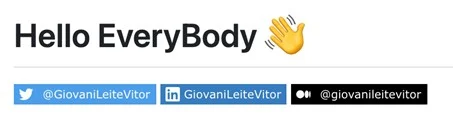
To apply this type of effect, simply use the code snippet below (modifying the attributes, obviously 🙂):
To visualise the complete README file, simply access the following link:
https://github.com/giovanileitevitor/giovanileitevitor/blob/main/README.md
Each platform generally has its own mechanism, but for a starting point I will use GitHub as an example, as it is a free and extremely popular platform in the software development community.
Here's a step-by-step guide:


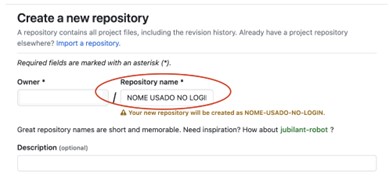
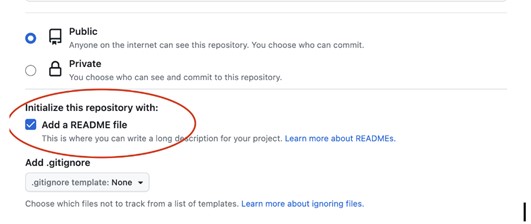

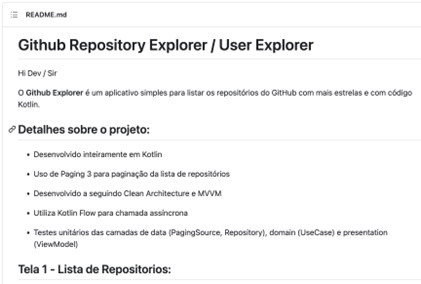
Notice that each element has special markup represented inside the brackets by the symbol #.
That's the great thing about HTML markups in a README file: you can generate infinite combinations and formats. It's also possible to add JS scripts and applets (to the delight of old-school programmers).
Hello, code explorer!
If you've arrived here, it's because at some point you searched for or were redirected to something related to README.md files.
Without further ado, README files have existed since the early days of the first code sharing. There isn't an exact date of when this came up or who was the first programmer to propose it, but the fact is that the existence of these files emerged precisely when several programmers interacted with the same code using version control systems (Git / TortoiseSVN / others).
Essentially, the idea of a README file is to provide the user with the basic information they need to read, process, or interact with a specific program or source code. Therefore, it should be the first file that the user or reader of that source code/product should pay attention to.
A very common and accepted analogy is this:
README > READ ME FIRST > USER MANUAL
Each platform or product usually has its own file format for this purpose. In the era of CD-ROMs, these files generally had the ".txt" extension. However, over time and with the increasing popularity of code versioning platforms (GitHub, GitLab, among others), the community adopted the ".md" extension as the standard format.
Today, the majority of code repositories and software manufacturer websites use the ".md" format combined with HTML markup, and this combination has several advantages.
The use of HTML markups allows for the creation of interactive objects (animations, links, text effects, etc.).
See the example below:
To apply this type of effect, simply use the code snippet below (modifying the attributes, obviously 🙂):
To visualise the complete README file, simply access the following link:
https://github.com/giovanileitevitor/giovanileitevitor/blob/main/README.md
Each platform generally has its own mechanism, but for a starting point I will use GitHub as an example, as it is a free and extremely popular platform in the software development community.
Here's a step-by-step guide:
Notice that each element has special markup represented inside the brackets by the symbol #.
That's the great thing about HTML markups in a README file: you can generate infinite combinations and formats. It's also possible to add JS scripts and applets (to the delight of old-school programmers).