
How we impact
act PROSPERI.AI
Act Digital Corporate Artificial Intelligence
Solutions
Services
Partners
AWS (Amazon Web Services) S3 Multipart Upload ist eine Funktion, die es ermöglicht, große Objekte (Dateien) in kleineren AWS (Amazon Web Services) S3 Multipart Upload is a feature that allows uploading of large objects (files) to Amazon Simple Storage Service (S3) in smaller parts, or “chunks”, and then assemble them on the server-side to create the complete object.
This process offers several advantages over traditional single-part uploads:
To initiate a multipart upload, we need to create a new multipart upload request with the S3 API, and then upload individual parts of the object in separate API calls, each one identified by a unique part number.
Once all parts are uploaded, the multipart upload is completed and S3 will assemble the parts into the final object. Additionally, you can abort a multipart upload at any point to clean up any uploaded parts and save on storage costs.
Multipart uploads are commonly used when dealing with files typically larger than 100 MB or when unstable network conditions during the upload process are foreseen.
This article intends to illustrate the advantages of AWS S3 multipart uploads in a detailed and practical way, by providing an implementation using Dropzone.js and Python’s Flask framework together with AWS S3 boto3 Python SDK.
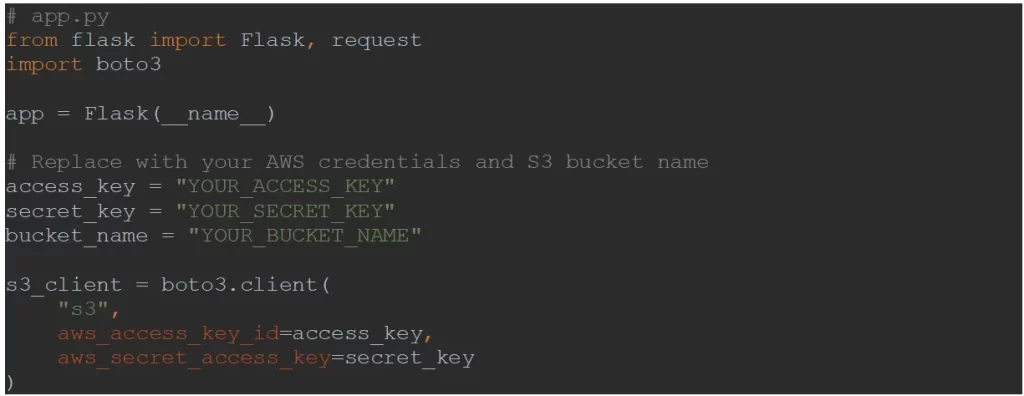
For security reasons, the requests to S3 are proxied via a Flask restful API. Let us start by creating and setting up the Flask app:
Next, we are going to create three Flask endpoints for the following functionalities:
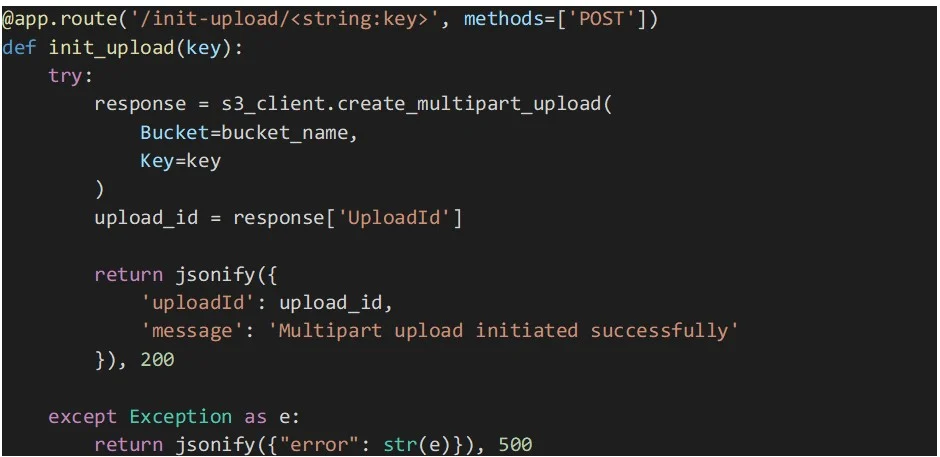
The endpoint implementation below starts a multipart upload to the specified S3 bucket and object key using the Boto3 SDK.
The “create_multipart_upload” function is called to create a new multipart upload, and the “UploadId” returned by the API is included in the response.um einen neuen mehrteiligen Upload zu erstellen, und die von der API zurückgegebene „UploadId“ ist in der Antwort enthalten.
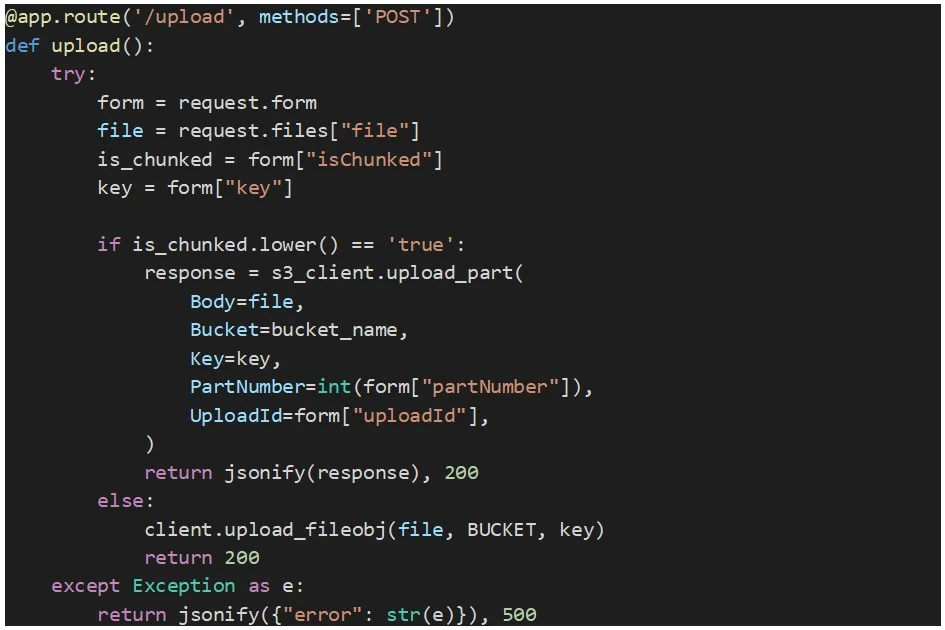
This endpoint receives a file, or a file part, as binary data along with the S3 object key, the upload ID (obtained from the “create_multipart_upload” method), the part number (unique number for each part starting from 1), and a flag that indicates if the upload is of a file part or an entire file.
The part is uploaded to S3 using the method “upload_part”. Below you can find the source code for this endpoint:
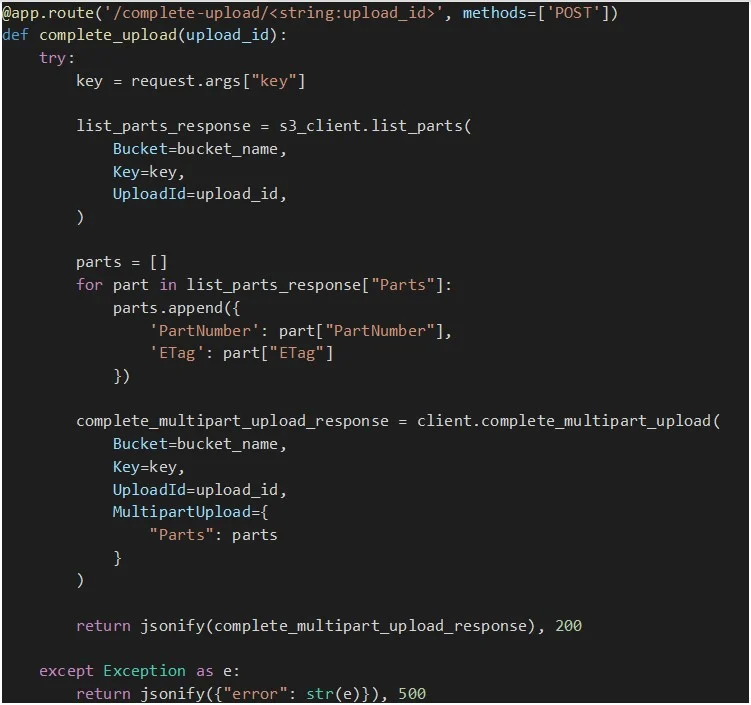
Once all file parts are successfully uploaded, this endpoint is called to complete the multipart upload. But first we need to have an ongoing multipart upload and all the necessary information about the parts uploaded so far, such as the ETag (an MD5 hash representing the part's data) and part numbers.
To get this data about the parts that have already been uploaded for a given multipart upload, we call the method “list_parts” that retrieves a list of dictionaries, each representing an uploaded part, containing details like part number and ETag.
Once we have all the parts info, the “complete_multipart_upload” method is called so that S3 assembles all the parts into the final object and makes it available in our bucket.
The following is an implementation of the endpoint:
To implement the web front-end side, we will use Dropzone.js, which is a widely popular open-source JavaScript library that provides an elegant and flexible way to implement file uploads with drag-and-drop functionality. It simplifies the process of handling file uploads by providing an out of the box user-friendly interface, and it handles various upload-related tasks, such as file validation, chunking of large files, and support for multiple file uploads.
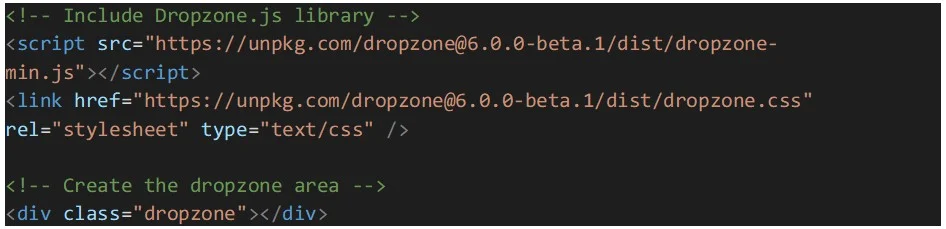
Let’s start by setting up Dropzone.js by including it in the HTML file. We can either download the library and reference it locally, or use a CDN link. Additionally, an HTML element needs to be created to act as the dropzone area, where users can drag and drop files:
The next step is the configuration of Dropzone.js:
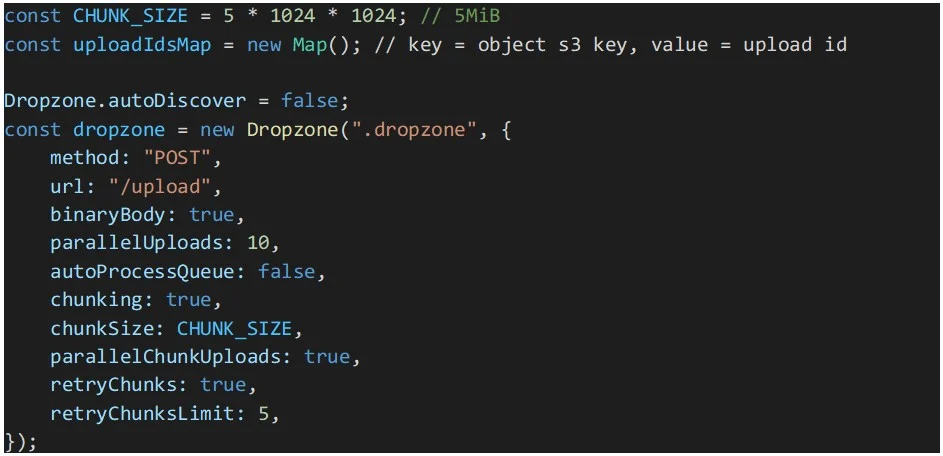
In the above code snippet, a constant for the chunk size will be used by Dropzone to split files into 5MiB parts or chunks. Note that the size is in mebibytes and not megabytes. A mebibyte is slightly larger than a megabyte and 5 MiB is the minimum part size supported by AWS S3 multipart uploads. Dropzone will chunk all files equal or larger than the “chunkSize” value.
To speed up file uploads, parallelization of parts uploads is enabled. And to make our multipart uploads more resilient, retries were enabled for the parts uploads that might fail.
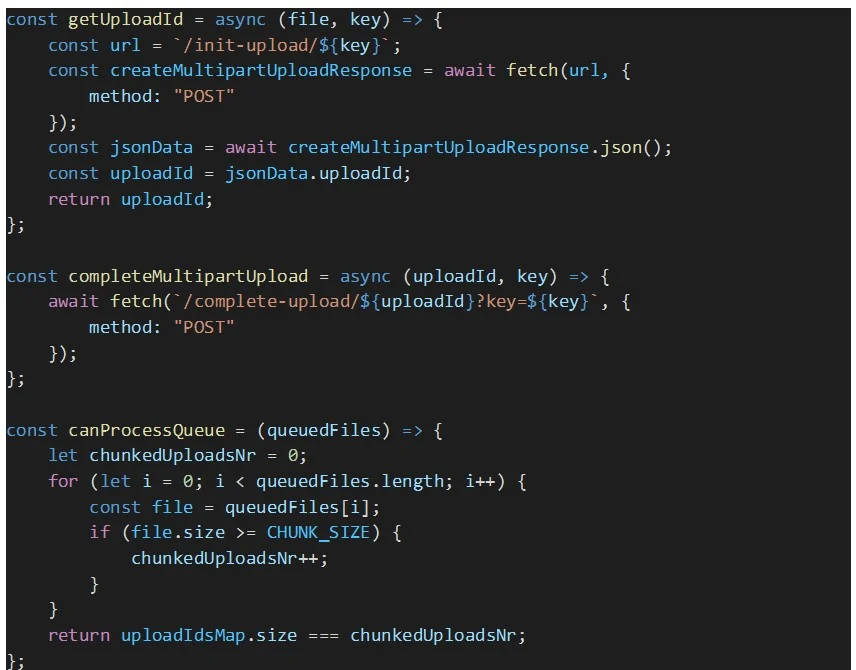
Auto processing of queued files was disabled because we need to assure that all the queued files get their AWS S3 multipart upload ID, before Dropzone starts processing the files in the queue. Otherwise, there is a risk that some files parts upload will fail due to missing upload ID. These IDs are stored in the map “uploadIdsMap”.
Note: Be sure to defer the initialization of Dropzone until the page is loaded. This can be achieved with, e.g., an immediately invoked function expression.
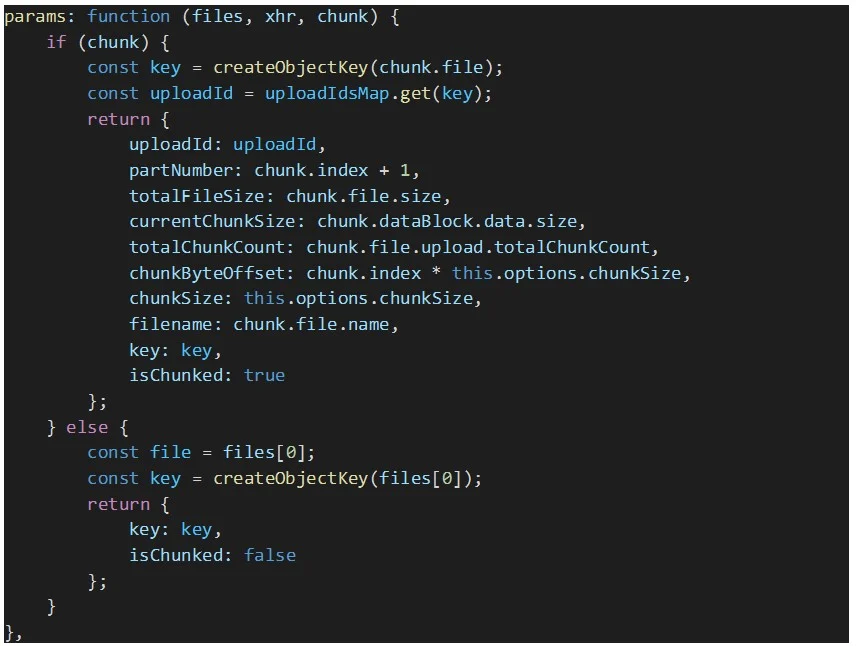
Since we need Dropzone to send custom parameters in every upload request, e.g., the multipart upload ID and the S3 key of the file being uploaded, among other data, we need to override the Dropzone’s “params” option as seen below:
To create the S3 object key for the uploaded file, the following function is used:

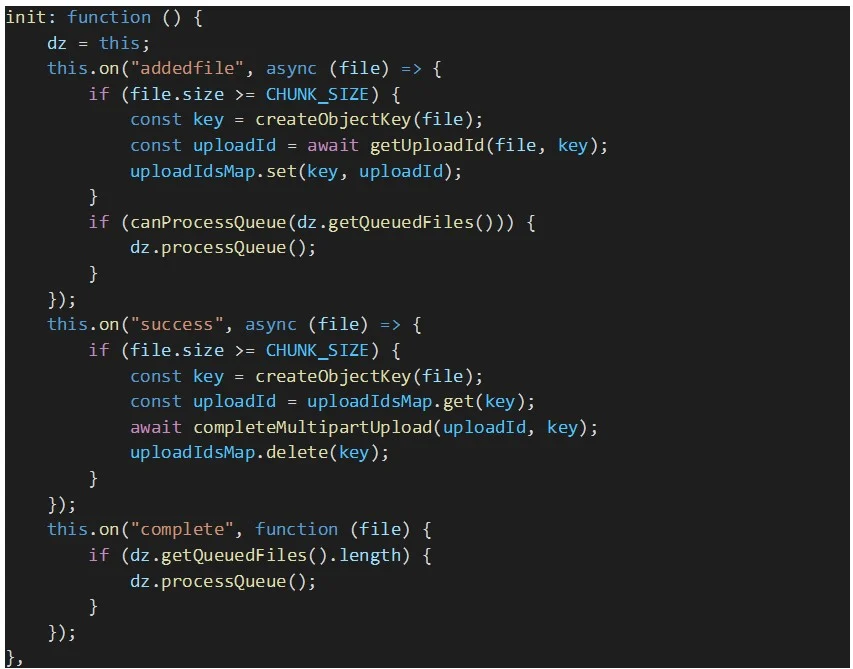
Finally, we need to handle the following Dropzone’s events:
Below you can find the code snippets that implement Dropzone’s event handlers described above, along with other auxiliary functions used in those handlers.
AWS S3 Multipart Uploads is a powerful feature that enhances the performance, reliability, and flexibility of uploading large objects to Amazon S3. By dividing objects into smaller parts, developers can take advantage of parallel uploads and resume capabilities, leading to faster and more reliable uploads.
Whether you are working on a data-intensive application, multimedia storage, or a content delivery system, understanding and implementing Multipart Uploads can significantly improve your S3 data management workflows, making it an essential tool in the arsenal of AWS cloud services.
AWS (Amazon Web Services) S3 Multipart Upload ist eine Funktion, die es ermöglicht, große Objekte (Dateien) in kleineren AWS (Amazon Web Services) S3 Multipart Upload is a feature that allows uploading of large objects (files) to Amazon Simple Storage Service (S3) in smaller parts, or “chunks”, and then assemble them on the server-side to create the complete object.
This process offers several advantages over traditional single-part uploads:
To initiate a multipart upload, we need to create a new multipart upload request with the S3 API, and then upload individual parts of the object in separate API calls, each one identified by a unique part number.
Once all parts are uploaded, the multipart upload is completed and S3 will assemble the parts into the final object. Additionally, you can abort a multipart upload at any point to clean up any uploaded parts and save on storage costs.
Multipart uploads are commonly used when dealing with files typically larger than 100 MB or when unstable network conditions during the upload process are foreseen.
This article intends to illustrate the advantages of AWS S3 multipart uploads in a detailed and practical way, by providing an implementation using Dropzone.js and Python’s Flask framework together with AWS S3 boto3 Python SDK.
For security reasons, the requests to S3 are proxied via a Flask restful API. Let us start by creating and setting up the Flask app:
Next, we are going to create three Flask endpoints for the following functionalities:
The endpoint implementation below starts a multipart upload to the specified S3 bucket and object key using the Boto3 SDK.
The “create_multipart_upload” function is called to create a new multipart upload, and the “UploadId” returned by the API is included in the response.um einen neuen mehrteiligen Upload zu erstellen, und die von der API zurückgegebene „UploadId“ ist in der Antwort enthalten.
This endpoint receives a file, or a file part, as binary data along with the S3 object key, the upload ID (obtained from the “create_multipart_upload” method), the part number (unique number for each part starting from 1), and a flag that indicates if the upload is of a file part or an entire file.
The part is uploaded to S3 using the method “upload_part”. Below you can find the source code for this endpoint:
Once all file parts are successfully uploaded, this endpoint is called to complete the multipart upload. But first we need to have an ongoing multipart upload and all the necessary information about the parts uploaded so far, such as the ETag (an MD5 hash representing the part's data) and part numbers.
To get this data about the parts that have already been uploaded for a given multipart upload, we call the method “list_parts” that retrieves a list of dictionaries, each representing an uploaded part, containing details like part number and ETag.
Once we have all the parts info, the “complete_multipart_upload” method is called so that S3 assembles all the parts into the final object and makes it available in our bucket.
The following is an implementation of the endpoint:
To implement the web front-end side, we will use Dropzone.js, which is a widely popular open-source JavaScript library that provides an elegant and flexible way to implement file uploads with drag-and-drop functionality. It simplifies the process of handling file uploads by providing an out of the box user-friendly interface, and it handles various upload-related tasks, such as file validation, chunking of large files, and support for multiple file uploads.
Let’s start by setting up Dropzone.js by including it in the HTML file. We can either download the library and reference it locally, or use a CDN link. Additionally, an HTML element needs to be created to act as the dropzone area, where users can drag and drop files:
The next step is the configuration of Dropzone.js:
In the above code snippet, a constant for the chunk size will be used by Dropzone to split files into 5MiB parts or chunks. Note that the size is in mebibytes and not megabytes. A mebibyte is slightly larger than a megabyte and 5 MiB is the minimum part size supported by AWS S3 multipart uploads. Dropzone will chunk all files equal or larger than the “chunkSize” value.
To speed up file uploads, parallelization of parts uploads is enabled. And to make our multipart uploads more resilient, retries were enabled for the parts uploads that might fail.
Auto processing of queued files was disabled because we need to assure that all the queued files get their AWS S3 multipart upload ID, before Dropzone starts processing the files in the queue. Otherwise, there is a risk that some files parts upload will fail due to missing upload ID. These IDs are stored in the map “uploadIdsMap”.
Note: Be sure to defer the initialization of Dropzone until the page is loaded. This can be achieved with, e.g., an immediately invoked function expression.
Since we need Dropzone to send custom parameters in every upload request, e.g., the multipart upload ID and the S3 key of the file being uploaded, among other data, we need to override the Dropzone’s “params” option as seen below:
To create the S3 object key for the uploaded file, the following function is used:
Finally, we need to handle the following Dropzone’s events:
Below you can find the code snippets that implement Dropzone’s event handlers described above, along with other auxiliary functions used in those handlers.
AWS S3 Multipart Uploads is a powerful feature that enhances the performance, reliability, and flexibility of uploading large objects to Amazon S3. By dividing objects into smaller parts, developers can take advantage of parallel uploads and resume capabilities, leading to faster and more reliable uploads.
Whether you are working on a data-intensive application, multimedia storage, or a content delivery system, understanding and implementing Multipart Uploads can significantly improve your S3 data management workflows, making it an essential tool in the arsenal of AWS cloud services.